My Amazon title must be 75 characters or less. Where do my keywords go?

So, here is the rule as Amazon publishes it, what goes in the new Item Highlights field, and how I split a long title without losing what makes it sell.
In This Article
What Exactly Does Amazon’s 75-Character Rule Say?
From Amazon’s title requirements page and its seller announcement:
The 75-Character Title Rule
- 75 characters or less, including spaces. The help page says the title must not exceed 75, so exactly 75 is fine.
- All product types except media. Books, music and video are out of scope.
- All stores except Saudi Arabia, Egypt, Türkiye and the UAE. The US, UK and Germany are all in.
- In force since 27 July 2026.
- No promotional phrases.
- Banned characters: exclamation marks, plus $ ? _ { } ^ ¬ ¦.
- No word more than twice. Your brand name counts toward that limit. Prepositions, articles and conjunctions don’t.
Amazon’s help page also says titles that break the rules may be corrected automatically or dropped from search. Its announcement adds one more thing. Titles still over 75 after 27 July are being replaced, gradually, with Amazon’s AI suggestion. The listing stays active while that happens, and brand owners get 14 days to review each suggestion.
If you work through Amazon’s API or feeds, the title is the item_name attribute and Item Highlights is title_differentiation.
What Goes in Item Highlights?
Item Highlights is a second field of up to 125 characters. Amazon describes it as space for materials or recommended use cases that help customers compare options. It’s searchable. It shows with your title in search results and on the detail page.
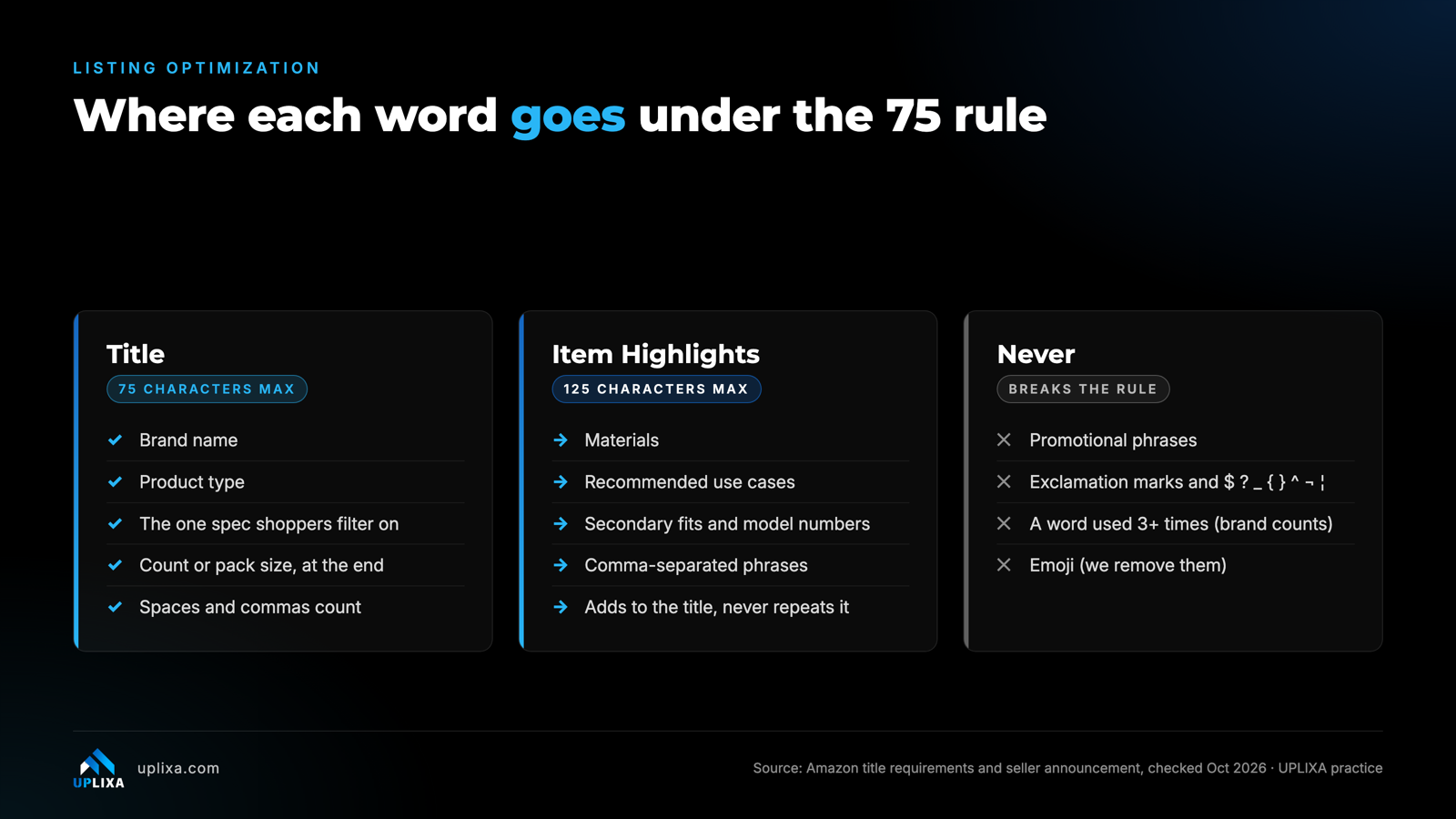
How I write it:
- Comma-separated phrases, the format Amazon’s help page describes.
- Add, don’t repeat. If the title already says “stainless steel," the highlight doesn’t need it again.
- Use the full 125. It holds everything the title had to drop.
- Fix the title first. Amazon’s notice to API developers says the highlight only works once the title is 75 characters or less. My team’s tooling refuses the combination.
How Do You Split a Long Title Without Losing Sales?
This is how I work from my end. None of it is an Amazon rule beyond the limits above. Think of it like packing a carry-on with a strict size limit. What you can’t travel without goes in the title. The rest goes in the second bag, Item Highlights.
- Count the way Amazon counts.Every space and comma is a character. I remove emoji instead of guessing how they count.
- Build the title from four parts.Brand, product type, the one detail a shopper filters on, and the count or pack size. For a replacement part, that detail is the compatible model number. For most other products, it’s the size or the spec buyers compare.
- Use the space.For one water-filter brand I work with, my rule is 72 to 75 characters, with the pack size at the end. Every character between 60 and 75 is room for something a shopper searches.
- Move the rest into Item Highlights.That means materials, use cases, secondary fits and the house model number. For that same brand, my rule puts the house model number at the start of the highlight, so it doesn’t crowd the title.
- Check the repeat rule.Read the title once just for duplicate words. A brand name that also appears in the product name already counts twice.
- Look at Amazon’s suggestion, then decide.In Seller Central, open Manage All Inventory, choose Edit on the listing, then View Enhancements. Amazon shows a suggested title and item highlights within the limits. It’s a starting point. Check it before you accept it.
- Validate before you commit.Through the API, my team runs every title through Amazon’s validation preview first.
Where This Goes Wrong
Common mistakes when adjusting titles include keeping the old long title, removing important product details without moving them into Item Highlights, repeating keywords unnecessarily, and accepting Amazon's suggested wording without reviewing it. The goal is not simply to shorten a title. It is to keep the most important shopping information visible while using Item Highlights for relevant supporting details.
Final Thoughts
Amazon’s 75-character title rule requires sellers to rethink how they structure their product listings. Simply shortening a title is not enough. You need to keep essential product information visible while using Item Highlights to communicate additional features, materials, and use cases. Reviewing your catalog, checking keyword placement, and validating updated titles can help prevent unnecessary listing issues and maintain a better shopping experience. With proper planning, sellers can adapt to the new requirements without losing the information that makes their products stand out.
Frequently Asked Questions (FAQs)
1. What is Amazon’s new 75-character title rule?
Amazon requires product titles to contain no more than 75 characters, including spaces, for most product categories and eligible marketplaces. The rule took effect on July 27, 2026, with certain media categories and marketplaces excluded.
2. Does Amazon deactivate listings with titles longer than 75 characters?
No. According to the announcement discussed in this article, affected listings remain active. However, Amazon may gradually replace non-compliant titles with AI-generated suggestions, and sellers should review and update their listings.
3. What is the Item Highlights field on Amazon?
Item Highlights is an additional listing field that allows sellers to provide up to 125 characters of relevant product information. It can include materials, recommended use cases, and other details that help customers compare products.
4. Can I use the same keywords in my title and item highlights?
It is better to avoid unnecessary repetition. Keep your primary product keywords and essential details in the title, then use Item Highlights for additional relevant information that does not already appear in the title.
5. How long does Amazon take to update item highlights?
Amazon states that changes to Item Highlights can take approximately 24 to 48 hours to appear. Sellers should allow this processing time before raising a support case about missing updates.
6. How can I check whether my Amazon product titles follow the new requirements?
Review your titles in Seller Central and check each one against the 75-character limit, prohibited characters, promotional wording restrictions, and duplicate-word rule. You can also review Amazon's suggested updates under Manage All Inventory and View Enhancements before accepting them.


Comments
Post a Comment