Amazon’s old settlement reports stop on 11 November. What do I change?

If you only check deposits in Seller Central, 11 November may pass without you noticing. Your accounting software, profit dashboard, or reimbursement tool will notice if it still asks Amazon for an old report.
From our end, we moved our own settlement pipeline to Flat File V2 in October 2026. The new files reconcile the deposit to the cent on every settlement we checked in seven currencies. Along the way, we found that every settlement line we’d stored from the old format had come in with no amount at all. The import had run. The money columns were empty.
That’s the risk with this change. It fails quietly. Your import may appear successful even when the financial amounts are missing.
It’s not a big job, though. The fix is a short checklist.
In This Article
1. What Exactly Is Amazon Removing?
Amazon is removing two settlement report types:
1. Flat File Settlement Report
GET_V2_SETTLEMENT_REPORT_DATA_FLAT_FILE
2. XML Settlement Report
GET_V2_SETTLEMENT_REPORT_DATA_XML
Amazon’s developer changelog says both will be removed for sellers on 11 November 2026, in all marketplaces. They were marked deprecated on 17 March 2025 with a removal date of 25 March 2026, which Amazon later moved to November. On Amazon’s deprecation schedule, “removed” means calls to the report fail from that date.
The replacement is the Flat File V2 Settlement Report (GET_V2_SETTLEMENT_REPORT_DATA_FLAT_FILE_V2). It’s available now. There is no XML replacement, so anything built on the XML file has to move to the V2 flat file.
Through Amazon’s API, settlement reports can’t be requested or scheduled. Amazon generates them for each settlement period.
2. Does This Change What I See in Seller Central?
Amazon’s help page on downloading payment reports still lists three buttons for each settlement:
- Download XML
- Download Flat File
- Download Flat File V2
You’ll find them on the All Statements page in the older Seller Central layout, or under Finance Report in the newer one. That page doesn’t say whether the first two buttons change on 11 November.
You don’t need to wait and see. Use “Download Flat File V2” from now on. Amazon says FBA sellers can use it with the Settlement Summary Template to build a pivot table by order.
3. How Is Flat File V2 Different?
Amazon describes V2 as the same information in fewer columns. Same as a bank redesigning its statement. The money is the same, but software built for one layout can read the other as blanks.
In practice, there are five important differences:
From our end, here’s what fee and reimbursement lines look like in the V2 settlements we’ve read. A fulfillment fee has amount-type ItemFees and amount-description FBAPerUnitFulfillmentFee, as a negative amount. Reimbursements sit under amount-type FBA Inventory Reimbursement, with descriptions such as WAREHOUSE_LOST, WAREHOUSE_DAMAGE and REVERSAL_REIMBURSEMENT.
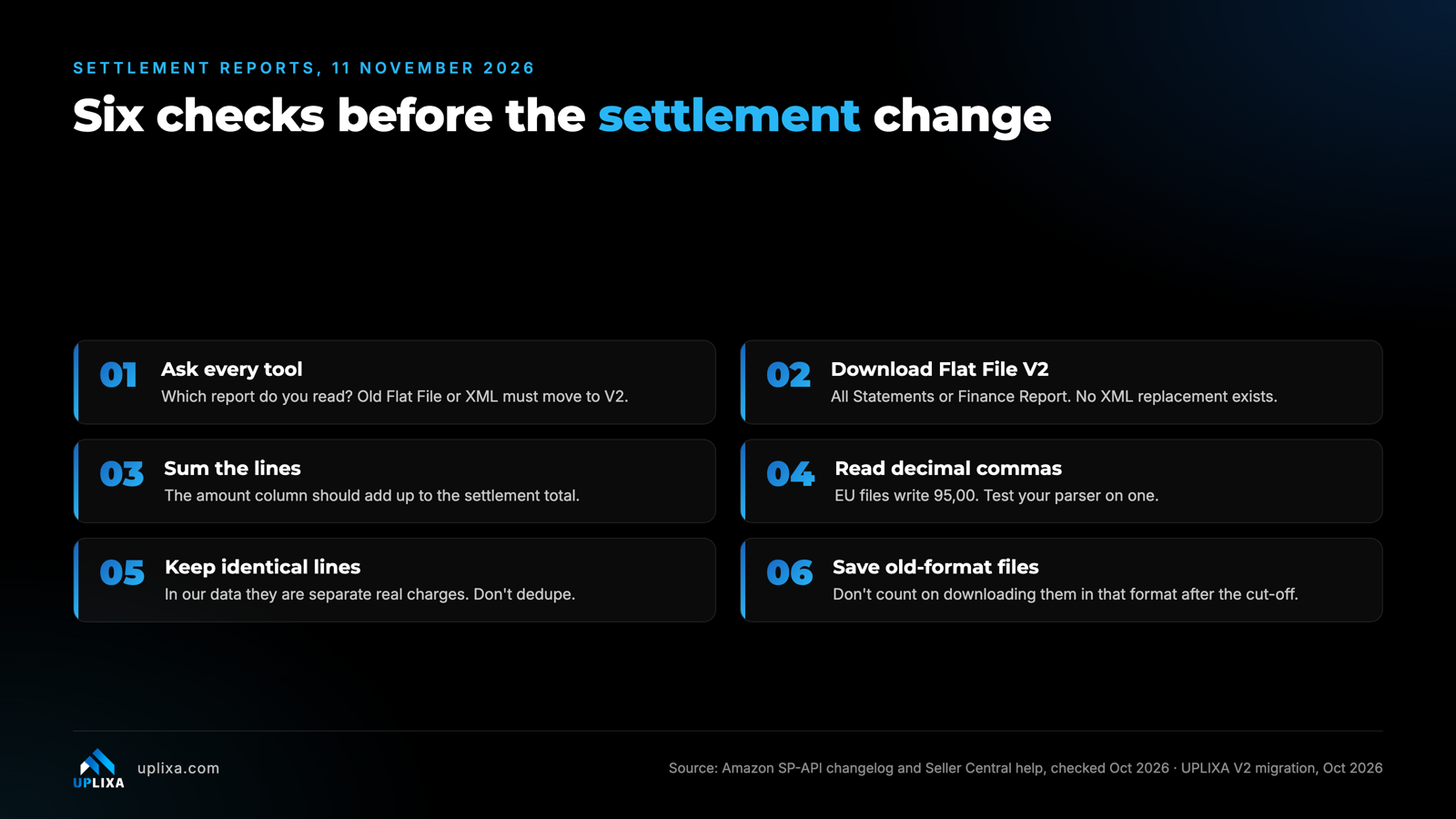
Checklist of six things to check before 11 November 2026: ask every tool which settlement report it reads, switch downloads to Flat File V2, make lines sum to the deposit, read decimal commas, keep identical lines, and save old-format files.
4. What Should Sellers and Their Tools Check Before 11 November?
Use this checklist to make sure your accounting and settlement systems are ready before Amazon removes the old formats.
Accounting, profit and margin dashboards, fee audits, reimbursement services, anything your bookkeeper uses.
Ask each one in writing which report it uses. If the answer is the plain Flat File or the XML report, ask for the date they move to V2. “We pull settlements” isn’t an answer.
Rebuild any spreadsheet or macro around the three amount columns. Old column names won’t be there.
For each settlement, the sum of the amount column should equal the settlement’s total. In our migration it matched to the cent every time. If yours doesn’t, something is being dropped.
A parser expecting 95.00 can misread 95,00 or skip it. Test with an EU settlement if you sell in Europe.
In our data, two lines that look exactly the same are separate real charges. A “remove duplicates” step deletes money.
Save the old-format files you already have. Don’t count on downloading them in that format after the cut-off.
5. Where This Goes Wrong
Even if you switch to the new format, a few technical problems can still affect your settlement records.
01. Blanks That Look Like Zeros
Our own case: a parser built for one layout, fed the other, stored empty amounts while the import kept running. An empty fee column reads like “no fees”. Check totals, not just that the import ran.
02. Fee Audits That Go Blind
Any check that compares expected FBA fees with what a settlement charged, or looks for reimbursement lines, reads these files. If the feed stops, nothing flags an overcharge. You just stop hearing about them.
03. Dedupe Steps
If your import removes duplicate rows, switch that off for settlement lines.
04. Assuming the Vendor Has It Covered
Amazon’s notice went to developers. Your tools may have moved already, or may not have. So, ask.
6. Frequently Asked Questions
When is Amazon removing the old settlement reports?
Amazon's announced removal date for the old Flat File and XML Settlement Report types is 11 November 2026.
What is the replacement for the old Amazon settlement reports?
The replacement is the Flat File V2 Settlement Report, also known as GET_V2_SETTLEMENT_REPORT_DATA_FLAT_FILE_V2.
Is there an XML replacement for Flat File V2?
No. Amazon does not provide an XML replacement for the old XML Settlement Report. Systems using XML need to migrate to Flat File V2.
Why can settlement imports show blank amounts?
An outdated parser may expect the old report columns and fail to recognize the new V2 amount structure. The import can run even when financial values are missing.
Should sellers keep their old settlement reports?
Yes. Save your existing XML and Flat File reports before the removal date so you can refer to historical settlement records when needed.
Final Thoughts
Amazon’s settlement report change is more than a file-format update. It can affect how sellers track deposits, reconcile transactions, audit FBA fees and identify missing reimbursements.
Switching to Flat File V2 before 11 November 2026 gives your accounting software, spreadsheets and third-party tools time to adjust. Most importantly, check the actual settlement amounts rather than assuming a successful import means everything is working.
A quick review now can prevent missing financial data and settlement reconciliation problems later.


Comments
Post a Comment